Groupify - Team Collaboration Tool
Team Collaboration and Project Management Tool
Overview
In today’s fast-paced corporate world, effective team management tools are indispensable for keeping up with global innovation. These tools have not only fueled exponential growth but have also become essential for product and service development across industries. Furthermore, their adaptability allowed companies to swiftly shift from office-based work to remote work during the COVID-19 pandemic. This paradigm shift has not only underscored the significance of these tools but also emphasized the need for their widespread adoption, particularly among the next generation of professionals.
Keywords
Product Design, Mobile App, User Experience, User Engagement, Team Management, Collaboration Tool, Teamwork, Usability Research, Requirements Elicitation, UI/UX, Flutter, Firebase, Firestore
Problem Background
While universities have made concerted efforts to integrate group work into their curricula, a gap exists in adequately preparing students for proficient team management practices and tools. The demand for graduates skilled in remote team management is growing, highlighting the importance of such experiences. Poor team management practices often lead to frustration and conflicts among student teammates. Existing team management tools present several challenges for students, including complexity, industry-specific specialization, and high costs.
Design Tools
Adobe XD
Development Tools
Flutter, Firebase, VSCode, XCode
Github repository
https://github.com/kamaleldincom/Groupify
Project Context
Project Aim
Mobile app design
I embarked on the Groupify project as a mobile team management tool tailored specifically for university students. Its primary aim is to address the following key objectives:
Facilitate streamlined teamwork processes.
Enhance efficiency and productivity in group work.
Improve the overall team collaboration experience.
Equip students with highly sought-after skills for the job market.
Project Objectives
The project is guided by the following objectives:
(a) Requirements Elicitation
I started with comprehensive gathering of requirements for the Groupify project management and collaboration system.
(b) Design and Architecture
I created architectural models, diagrams, databases, and user interfaces that align with Groupify’s mission.
Use Case Diagram
An Instance of Activity diagrams for inviting project members
(c) Development
I took on the task of developing Groupify based on the elicited requirements and designed models.
(d) Validation
I ensured the validation of Groupify through rigorous testing techniques to guarantee robust functionality.
Project Scope
Groupify’s scope encompasses the following key aspects:
A. Compatibility with Android and iOS devices, ensuring accessibility for a wide range of students.
B. Provision of practical solutions and tools catering specifically to students’ needs in a collaborative setting.
C. Support for lecturers and supervisors in monitoring and managing group projects, streamlining the educational process.
Importance and Impact
Project Importance
For me, Groupify represented a pivotal tool in the transformation of university education and workforce preparation. Its significance lies in the following areas:
Cultivating a Culture of Collaboration: Groupify fosters a culture of collaboration and teamwork among university students, aligning their experiences with modern workplace dynamics.
Enhancing Efficiency and Productivity: The application equips students with tools that significantly boost efficiency and productivity in teamwork environments, preparing them for future professional endeavors.
Fair and Transparent Assessment: Groupify provides a structured platform for educators to evaluate student group work, ensuring fairness and transparency in the grading process.
Project Dashboard showcasing users progress and contribution metrics.
Methodology
Research
The development of Groupify was grounded in comprehensive research:
User Research: I conducted in-depth analysis of prospective students’ needs and expectations, guiding design decisions to ensure alignment with users’ requirements.
Market Research: A thorough examination of competitors in the education and consultancy sectors informed design choices, identifying opportunities for differentiation.
Some of the Market Competitors included in the research
Design Process
Wireframe Development: The project commenced with meticulous wireframing, mapping out the application’s structure, content hierarchy, and user flows.
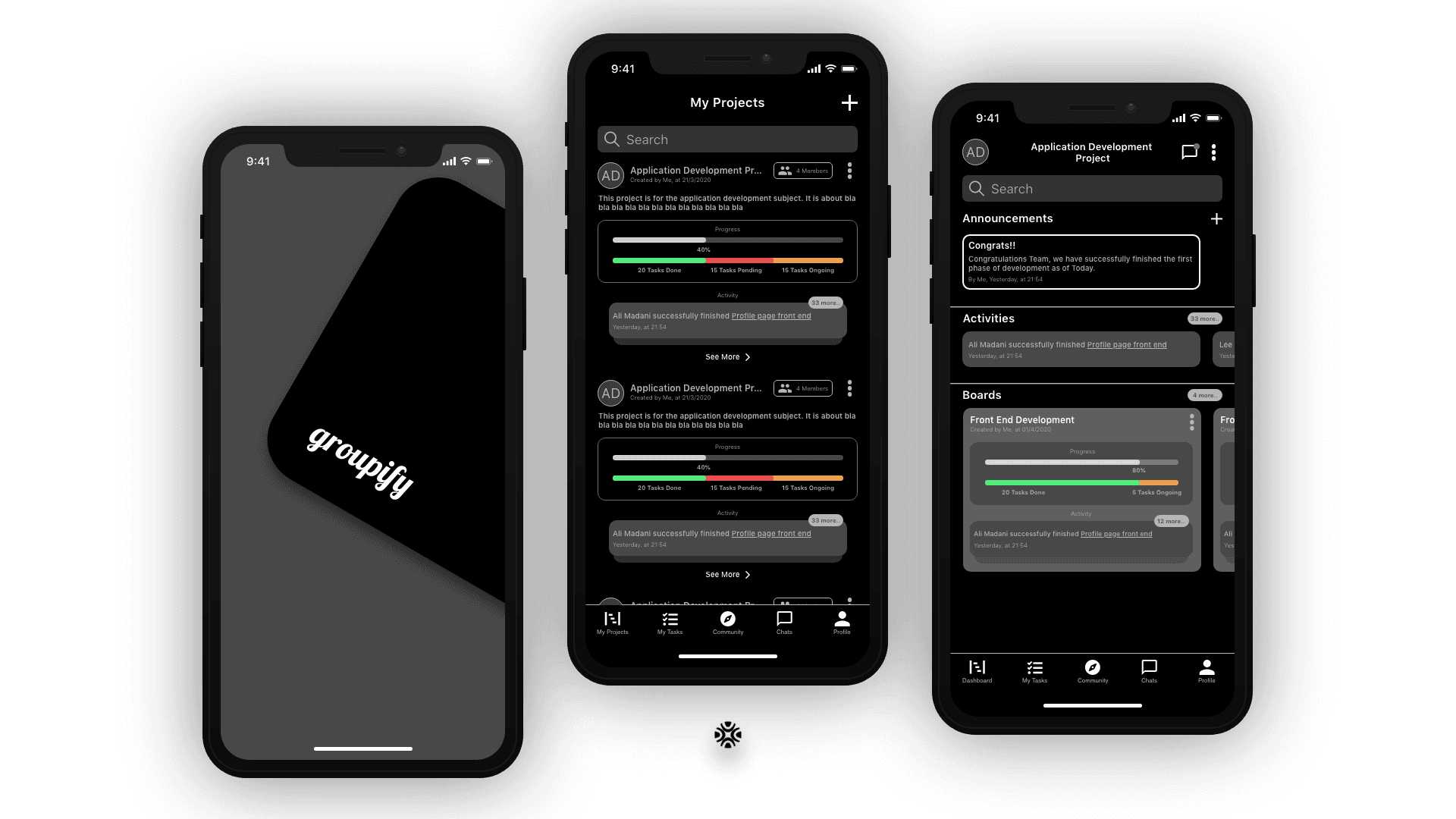
High-Fidelity Prototyping: I used Figma to create high-fidelity interactive prototypes that showcased the visual design, animations, and user interactions.
Splash and Landing page design
Development Process
During the implementation phase of this project, I translated the previously gathered requirements and design specifications into functional code. This phase played a pivotal role in turning the project’s concept into a tangible mobile application.
Implementation Tools and Technologies
To bring the project to life, I leveraged the following tools and technologies:
Flutter (Dart): Flutter, a versatile and efficient framework, was chosen as the development platform. Its key advantage is the ability to develop simultaneously for both iOS and Android operating systems. This ensured broader accessibility and a streamlined development process.
Firestore (Firebase): Firestore, a NoSql database solution, was utilized for tasks such as authentication and file storage. Its capabilities perfectly complemented the requirements of the application.
Database design for the NoSql database
Architecture and Methodology
The development process adhered to the Model-View-ViewModel (MVVM) architectural pattern. MVVM promotes a clear separation of concerns and facilitates modular development, making it an ideal choice for ensuring maintainability and scalability of the application.
Model-View-ViewModel (MVVM) architectural pattern design
Key Development Milestones
Code Translation: I systematically translated the Software Requirement Specification (SRS) and high-fidelity designs into code. This process involved creating the various components, functionalities, and user interfaces outlined in the design phase.
User Authentication: Implementing user authentication was a critical component of the development process. This feature ensured secure access to the application and personalized user experiences.
Database Integration: Firestore, our selected NoSQL database, was integrated into the application. This step allowed for efficient data storage, retrieval, and management, enabling seamless interactions within the app.
User Interface Refinement: During implementation, the user interface underwent continuous refinement. Iterative adjustments were made to enhance the app’s visual appeal and usability. User feedback and testing insights played a significant role in this refinement process.
Cross-Platform Compatibility: Flutter’s cross-platform capabilities were fully leveraged, ensuring that the application would function consistently on both Android and iOS devices.
Testing Integration: Although formal testing was scheduled for the subsequent phase, initial testing and debugging were ongoing throughout the implementation process. This proactive approach aimed to identify and rectify issues promptly, reducing the likelihood of significant defects.
Challenges and Achievements
While the implementation phase presented several challenges, it was a critical juncture in realizing the project’s vision. Developing an application capable of effectively managing team collaboration required meticulous attention to detail and functionality. Ensuring a seamless user experience across multiple devices and operating systems was a noteworthy accomplishment.
In conclusion, the implementation phase marked a pivotal step in transforming the project from concept to reality. It involved the translation of requirements and designs into functional code, integrating essential features, and refining the user interface. The choice of technologies, such as Flutter and Firestore, proved instrumental in achieving our development goals.
User Testing
Usability Testing:
Prospective students actively engaged with interactive prototypes to assess user-friendliness, navigation, and overall experience.
Feedback Incorporation:
Insights from user testing were seamlessly integrated into the design to optimize user flows and enhance navigation.
Conclusion
The Groupify project represents a transformative venture in product design, aiming to revolutionize the way university students engage in teamwork and collaboration. By addressing challenges such as complexity in team management tools and the gap in preparing students for the modern workforce, Groupify stands poised to make a significant impact. As development progresses and the application transitions from beta testing to full launch, it is set to empower students and educators alike, preparing them for a future that increasingly values collaboration, efficiency, and adaptability.